Arbitrage scanner
Updated: 2026-11-14
The arbitrage scanner looks for the same asset priced or funded differently on two venues. You go long where it’s cheap and short where it’s expensive, so the price direction mostly cancels out, and you collect the difference. Every pair is ranked by net return, after trading fees on all four fills and the slippage of walking the real order book at your size. It’s a screening signal, not financial advice.
Where to find it
Open Scanner and add Arbitrage scanner from the Crypto group of New window, or use the Arbitrage preset. Open Arbitrage scanner →
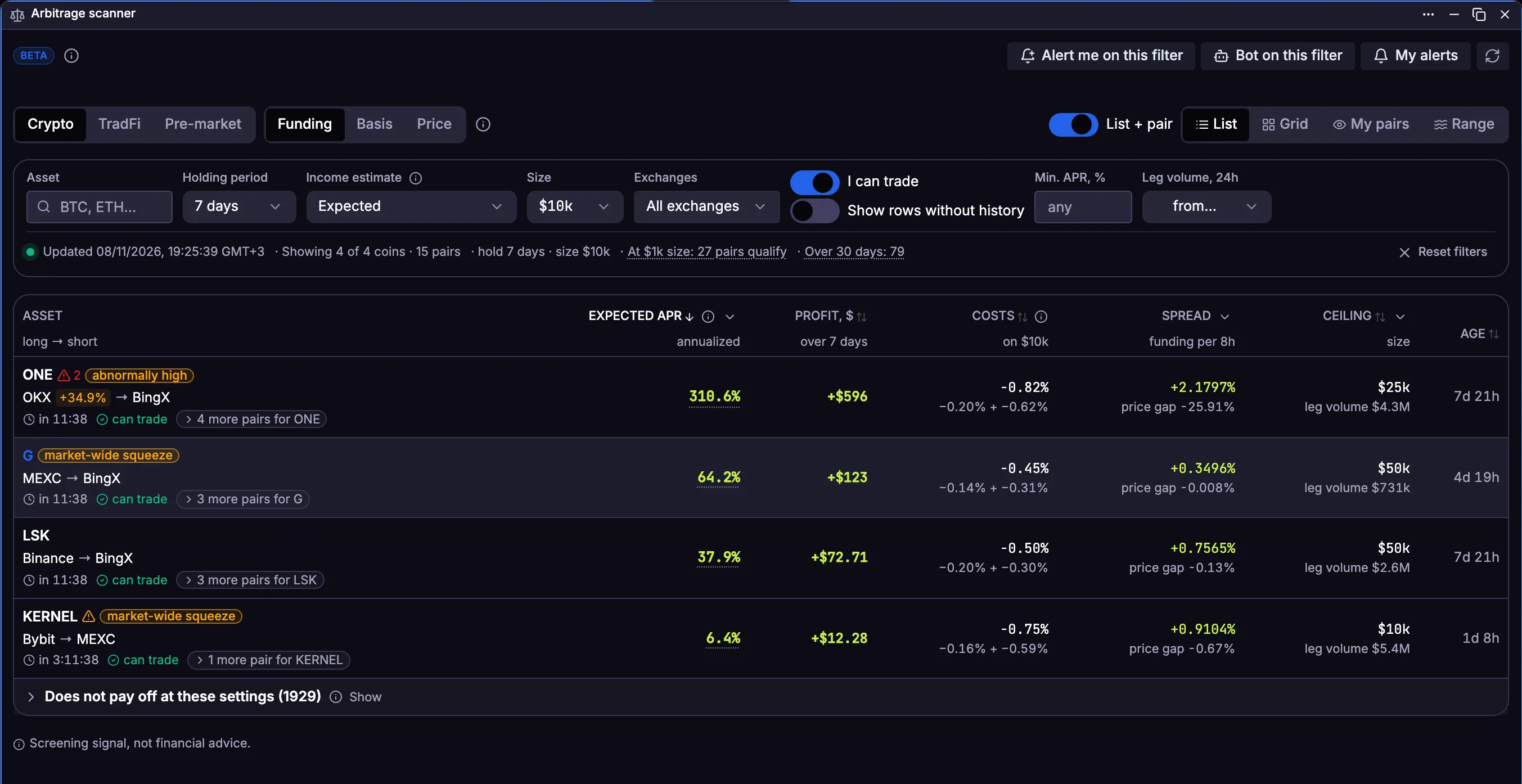 The arbitrage scanner on the Funding preset. Each row is the best pair for one coin.
Three kinds of opportunity
| Preset | The trade | Main number |
|---|---|---|
| Funding | Long the perpetual with the lower funding rate, short the one with the higher rate, and collect the difference on every funding payment. | Expected APR over your holding period |
| Basis | Spot against a perpetual, or two contracts whose prices differ, held until the gap converges. | Expected APR over your holding period |
| Price | An instant price gap between two exchanges. | Net return right now. Funding for the next 8 hours is shown separately and not included. |
Asset classes: Crypto (the default), TradFi (stocks, ETFs, metals and currencies traded as perpetuals) and Pre-market (pre-IPO contracts). In pre-market there’s no underlying asset anywhere, so a gap may never close.
Views: List, Grid (funding rates of each asset by exchange), My pairs (pairs you watch) and Range (pairs that keep swinging inside their own corridor). Turn on List + pair to open a clicked pair in a panel beside the list on a wide screen.
Filters
| Filter | What it does |
|---|---|
| Asset | Search by coin. |
| Holding period | From 8 hours to 30 days, 7 days by default. Hidden for Price. |
| Income estimate | Expected (part current spread, part five-day average), Current rate (as if today’s rate held for the whole period) or 7-day average (as if the past week repeated). |
| Size | From $1,000 to $250,000, $10,000 by default. Costs and the ceiling are computed at this size. |
| Exchanges | Both legs must be inside your selection. |
| I can trade | Only pairs where you have keys on both exchanges. It turns on by itself once you’ve connected at least two exchanges. |
| Min. APR, % and Leg volume, 24h | Thresholds. Leg volume is $50k by default. |
| Show rows without history | Shows pairs with less than a day of funding data. They have no expected APR. |
The line under the filters shows when the data was last updated and how many coins and pairs you see. The data refreshes every 30 seconds. Reset filters clears everything.
Reading a row
| Column | Meaning |
|---|---|
| Asset, long → short | The coin and the two exchanges. “N more pairs for…” expands other exchange combinations for the same coin. |
| Expected APR | A blend of today’s spread and the pair’s own five-day average, net of costs. The small “now” figure is the current rate alone. A rate far above its usual range gets a spike flag such as “abnormally high”. |
| Profit, $ | Dollar income over your holding period at your size. |
| Costs | Fees for opening and closing both legs, plus slippage, at your size. |
| Spread | The funding difference per 8 hours, and the price gap between the legs. |
| Ceiling | The largest size at which the trade is still net-positive given today’s book depth, plus the thinner leg’s 24h volume. |
| Age | How long the opportunity has existed. |
Each row also shows the time to the next funding payment and a readiness mark: can trade (keys on both exchanges), no key: followed by the exchange name (a link that opens the connect dialog), or a note that a venue can’t be connected and that leg can only be traded on the exchange itself. Pairs that don’t pay off at your settings are collapsed under Does not pay off at these settings.
The opportunity card
Click a row to open the pair. At the top is a summary: the main number, the dollar income at your size, when the trade pays back its costs, and the signal quality. Below it are three actions:
- Trade manually opens the pair in Terminal Turbo’s Pair window.
- To bots opens the new-bot form with this pair’s kind, coin and exchanges.
- Watch this pair adds it to My pairs. You get a notification if funding turns against you or the pair closes.
Readiness checks each exchange: whether a key is connected, how much is available within your account limits, and how much this trade needs. If money is short, it names the exchange and the amount. Top up on the exchange itself; the panel doesn’t move funds between exchanges.
For Funding and Basis, the card also shows where the number comes from (the current spread, the five-day average, the four-leg fees, slippage and the price gap), a table across sizes up to the ceiling, each leg’s bid, ask, funding, interval and fee, the asset’s price on every exchange, Pair history (“if you had entered 1, 3 or 7 days ago” from real accruals), consistency (the share of the last 168 hours the spread was in your favor), and Coin health (deposits and withdrawals, delisting notices, and a Don’t trade this coin button).
Trade it manually in Turbo
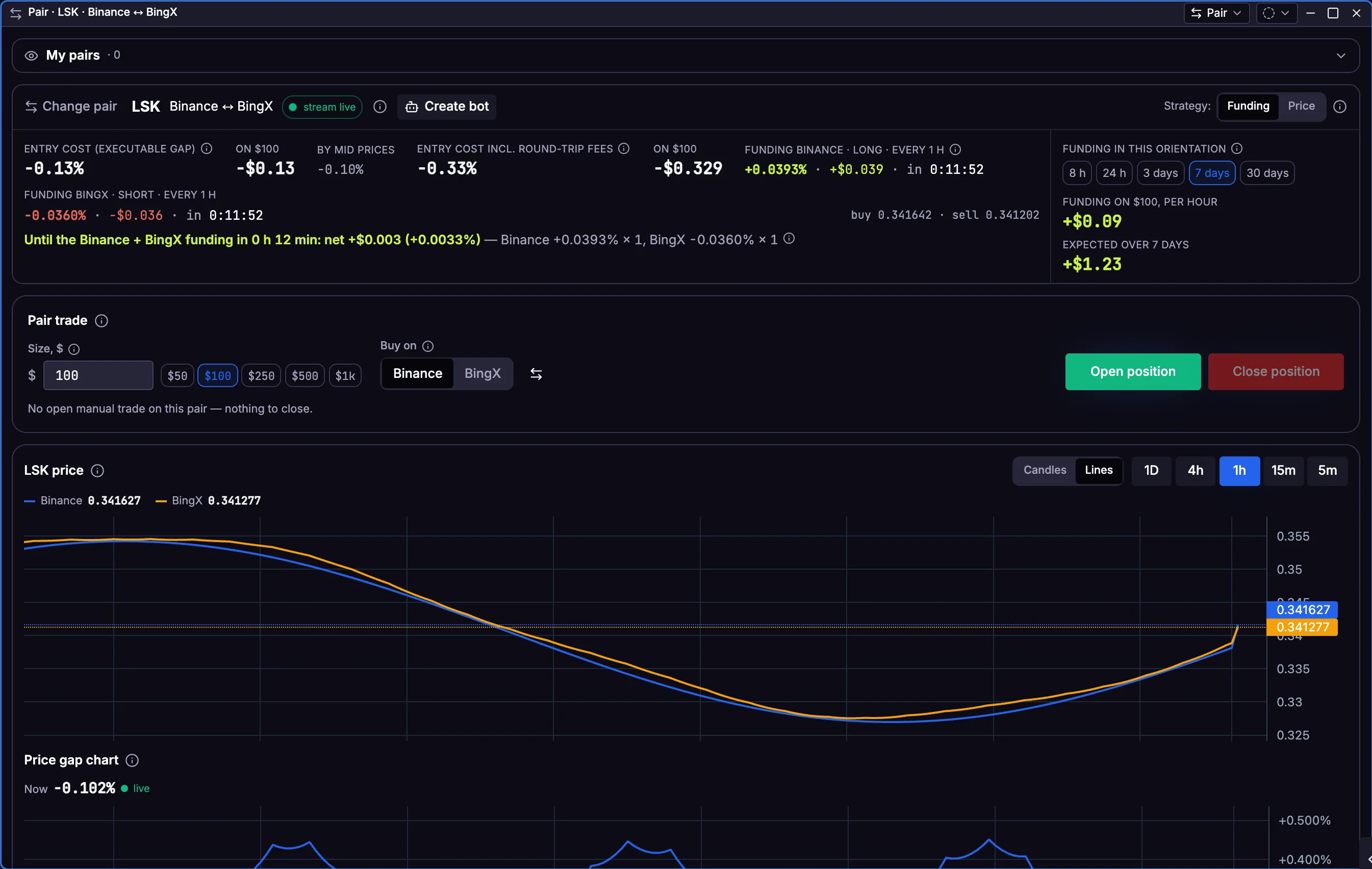 The Pair window: one ticket for both legs, with entry cost and funding in this orientation.
The Pair window shows the entry cost (the executable gap), the cost including round-trip fees, the funding of each leg with a countdown, and the expected income over your chosen horizon. In Pair trade, set one size for both legs, choose where you buy, and press Open position. A market order goes to each exchange. Close position closes both legs together. See Pair arbitrage in Turbo.
Automate it
- Bot on this filter (top right of the scanner) opens the new-bot form with your current preset, exchanges, coin, holding period and minimum leg volume. You set the minimum APR yourself.
- To bots or Create bot on a pair creates a bot for that specific pair.
Arbitrage bots start in simulation. Live trading needs your explicit confirmation. See Arbitrage bots.
Alerts
Alert me on this filter saves the current filters as a rule, with an optional minimum profit. New matches arrive in the notification bell. My alerts lists your rules, where you can pause, resume or delete them, along with how often each has fired. Rules also appear under Saved → Alerts.
Risks
- Expected APR is an estimate. Funding rates change every interval and can flip against you.
- Both legs carry margin. A sharp move can liquidate one leg before the other if your margin is thin.
- Slippage grows with size. Above the ceiling, the edge is gone before you collect anything.
- An exchange can halt withdrawals, delist a coin or lag on prices. Check Coin health before entering.
- Create exchange API keys without withdrawal permission. See Exchange keys.