How the backtester is laid out
Updated: 2026-11-14
The backtester works like Terminal Turbo: a screen of free-floating windows you can move, resize and pop out to another monitor. Windows that belong together are linked by color and always show the same run. If you prefer one classic screen, a single window holds everything behind a section rail.
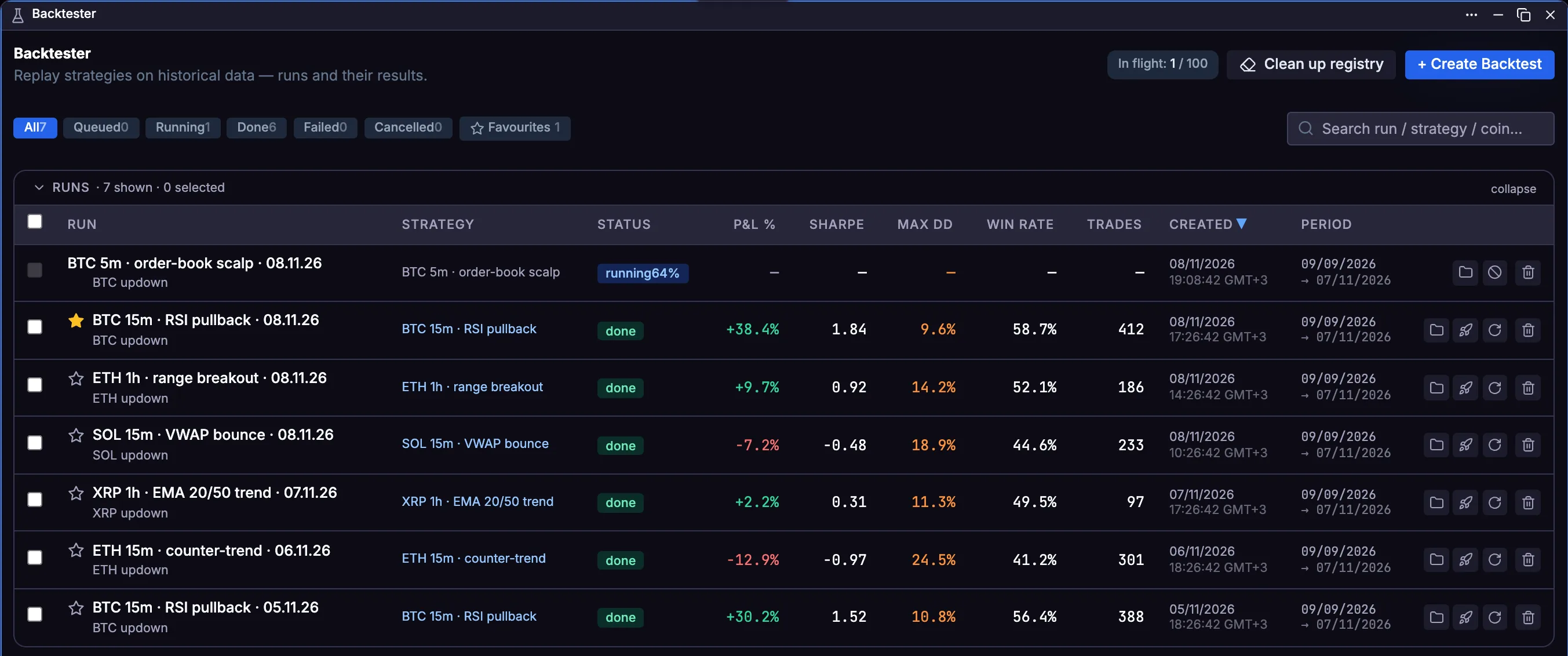 The Backtester window on a desk: status tabs, search, the runs table and row actions (folder, promote, restart, delete).
The market switch
At the top you choose the market: All, Up/Down, Crypto or Stocks & derivatives. The choice filters the registry and preselects the form for a new run. Links can carry it too, for example ?market=crypto.
The section rail
The Backtester (all-in-one) window has a rail on the left with every section:
| Section | What it is |
|---|---|
| New backtest | The run form for Up/Down, crypto or stocks — details |
| Registry | Your strategies and runs, folders, cleanup — details |
| Current run → Progress | Live progress and the engine log while a run computes |
| Current run → Results | Final metrics and charts — details |
| Current run → Trades | Every trade and the trade card — details |
| Current run → Validation | Skill-or-luck checks — details |
| Current run → Analytics | Where the edge lives — details |
| Compare runs | Selected runs side by side |
| To bot | Opens bot creation with this run |
A run opened anywhere else, for example on the Algo trading desk, gets the same sections as tabs: Run · Results · Trades · Validation · Analytics. Switching sections keeps the same window; a run that is already open is raised instead of opened twice. On a phone the sections become a list.
Windows
Open any of these from New window. Each one shows the run of its color group.
| Group | Windows |
|---|---|
| Run | Results, Equity and drawdown, Trades, Trade card |
| Check | Validation, Gates, Analytics, Optimization, Risk, Batch runs |
| Compare | Registry, Strategies, Compare, Portfolio of runs |
| Tools | Backtester (all-in-one), Constructor, New run, Run progress, Strategy, Bot vs backtest |
Linking. Pick a run in the Registry and every window of the same color switches to it. Click a trade in Trades and the Trade card of that color opens it. Two color groups side by side let you study two runs at once.
Some windows are for crypto and stock runs only: Gates, Optimization, Risk, Batch runs, Portfolio of runs and Bot vs backtest. For Up/Down, the equivalent checks live in Validation.
Layouts
Layouts places a ready set of windows in one click:
| Layout | Windows |
|---|---|
| Strategy (default) | Strategies · Constructor · Results |
| Classic | One Backtester window with its section rail |
| Run overview | Registry · results · trades · equity |
| Trade review | Trades · trade card · equity · analytics |
| Check before bot | Results · gates · validation · strategy |
| Compare two runs | Green and blue groups side by side + comparison |
| Edit and re-run | Strategy · results · before / after |
Your own arrangement is remembered. See Layouts and monitors for multi-monitor setups.
Run statuses
A run goes Queued → Running → Done, or ends as Failed or Cancelled. While it runs, Run progress shows a progress bar and the engine’s live log. For crypto and stock runs you see an estimate of time left based on your past runs; a long period on a short timeframe can take a few minutes. When it finishes, Results open. You can leave an Up/Down run: a bell notification tells you when it’s done.
If an Up/Down run stalls, it is retried automatically; after repeated failures it is marked Failed. If a crypto or stock run fails, Fix the strategy takes you back to the builder.
Limits
- In flight: N / M in the registry counts runs that are queued or running against your plan’s limit. It isn’t a total allowance: a slot frees up as soon as a run finishes.
- An Up/Down run covers at most 365 days.
- For crypto and stocks, the data source may keep short timeframes only for a limited number of days. The form tells you and offers a period that fits.