Crypto options in Turbo
Updated: 2026-11-14
The Options window in Terminal Turbo shows the strike chain of one coin on one exchange and places orders for a single option. For combinations — spreads, straddles, condors, options mixed with perps or Polymarket — use the Position builder, which opens next to it.
Before you start
- Connect an exchange that has options — Bybit, Binance or OKX — under Money → Exchanges & keys, with trading rights and no withdrawal rights. See Exchange keys.
- Make sure options trading is enabled on your exchange account itself.
- Placing orders needs an active plan.
Where to find it
Open Terminal Turbo and apply Presets → Options: Options, Position Builder and Chart on Bybit, plus a Portfolio across all exchanges. Or add New window → Options on any exchange. Open Terminal Turbo →
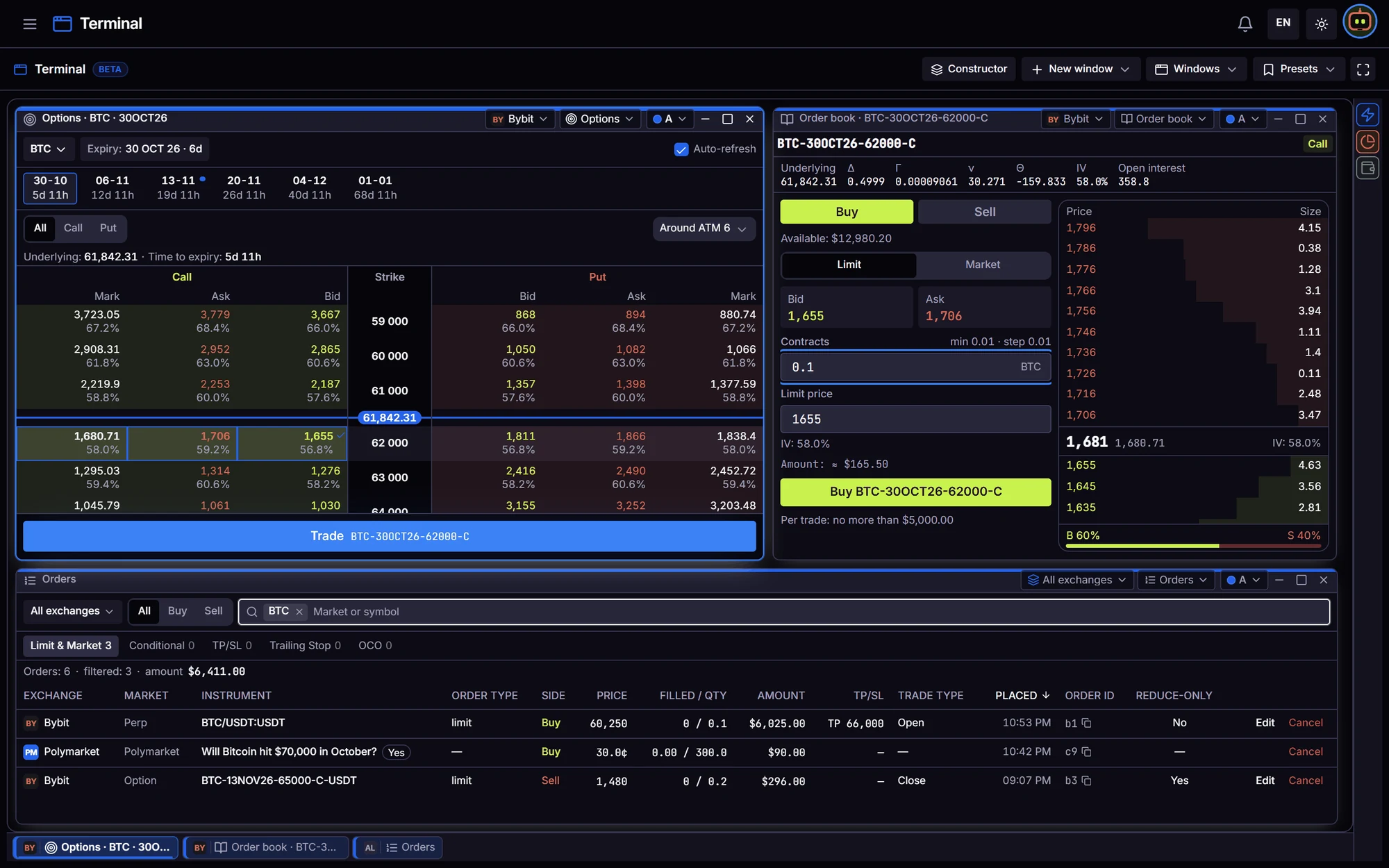 Left: the BTC chain with calls and puts around the underlying price. Right: the selected call’s book and ticket with its greeks. Below: open orders. Demo data.
Reading the chain
| Part | What it shows |
|---|---|
| Coin and Expiry | The coin, and expiry dates with days and hours left. A dot marks expiries where you hold positions. |
| All / Call / Put | Which side of the chain to show. |
| Around ATM n / All strikes | How many strikes around the current price to show. |
| Columns | Mark, Ask and Bid for calls and puts, each with its implied volatility (IV) below the price. Strike is in the middle. |
| Underlying line | The coin’s current price, drawn across the chain between strikes, and the time to expiry. |
| Auto-refresh | Keeps quotes updating. “quotes are stale” means the last update is old. |
Your own positions are marked on the chain (L for long, S for short).
Exchange differences
| Bybit | Binance | OKX | |
|---|---|---|---|
| Market orders on options | Yes | No — limit only | No — limit only |
| Live quote stream | Yes | Quotes refresh every few seconds | Quotes refresh every few seconds |
| Prices | In dollars | In dollars | In the coin — the window converts to dollars at the coin’s index |
On OKX the quantity is also in the coin: “one contract = {size} {coin}”. Orders still go to OKX in its own units.
Placing an option order
Pick a strike and press Trade. The option’s screen opens with its live order book and a ticket.
- The ticket header shows the underlying price and the option’s greeks as the exchange publishes them: delta (Δ), gamma (Γ), vega (ν), theta (Θ), IV and Open interest.
- Choose Buy or Sell. Available shows your free money on the account.
- Choose Limit or Market (market only on Bybit).
- Enter Contracts — the ticket shows the minimum and step, for example “min 0.01 · step 0.01”.
- For a limit order, set the Limit price. The ticket shows the IV at that price and the estimated Amount.
- Press the order button and confirm.
Common refusals: “At least {min} contracts”; “No quote or mark price yet — the amount can’t be estimated”; “This option is not traded anymore — the order was not sent”.
IV and greeks in plain words
Implied volatility (IV) is the volatility the option price implies — the market’s price for future movement. Option prices depend far more on how much the coin is expected to move than on which way. A bought option tends to make money when the coin moves more than the IV you paid for; a sold option, when it moves less. Before trading, ask “is this IV high or low for this coin?”, not only “up or down?”. Turbo shows implied volatility; it doesn’t show realized volatility, so judge the coin’s actual movement on the chart.
| Greek | What it tells you |
|---|---|
| Delta | How much the option gains if the coin rises by $1 |
| Gamma | How fast delta changes as the price moves; largest near the strike and near expiry |
| Theta | Value lost per day just from time passing — buyers pay it, sellers collect it |
| Vega | Value change for a 1-point move in IV |
IV isn’t one number per coin. It differs by strike (the smile or skew) and by expiry (the term structure). The Position builder draws both.
Closing and expiry
- Close an option from the Portfolio or Positions window (Close / Close selected). On Bybit, the exit P&L estimate includes the Bybit option fee. See Portfolio and positions.
- Expiry and roll reminders arrive as notifications. A roll link opens the Position builder with that position loaded.
- Settlement is in USDT on Bybit and Binance and in the coin on OKX. Bybit charges a delivery fee on options that expire in the money. Check your exchange’s rules for exercise details.
Risks
- Buying an option can lose the whole premium, even if you’re right on direction but the move is too small or too late.
- Selling an option earns a small premium against a potentially large loss: an uncovered call has no upper limit, an uncovered put can lose down to a zero price. Sellers often win small and lose big in rare sharp moves.
- Near expiry, gamma is highest and prices can swing hard.
- Option books are thinner than the coin’s. A wide spread is paid on entry and again on exit; far strikes and far expiries are usually the thinnest.
- The exchange sets margin and can refuse an order or liquidate a position.