Trades and the trade card
Updated: 2026-11-14
The Trades tab lists every trade of a run. Click any trade and the Trade card opens: charts, prices, fees, and every entry condition with its actual value. Any result can be checked down to a single trade.
On a desk, the Trades and Trade card windows of the same color are linked: click a trade in one, the card shows it. The next trade you click opens in the same card.
Up/Down trade log
Filters on top: All / Winners / Losers, an exit-reason filter with counts, sorting by Entry time or Net P&L, and a running net total. Trades are paged by 100.
| Field | Meaning |
|---|---|
| #N | trade number by entry time |
| UP / DOWN | which contract was bought. DOWN is buying the DOWN token, not shorting |
| Net P&L and % | net result; % of the amount invested |
| Entry → Exit | prices as probabilities (0 to 1) |
| Fee | both legs; a trade held to resolution pays only the entry fee |
| MAE / MFE | the worst and best move against the entry while the trade was open, % of entry |
| Hold | how long the trade was open |
| Context | exit reason plus how far into the contract the trade entered, e.g. “34% → 100% elapsed” |
| In / Out | entry and exit time in your timezone |
| Indicators at entry | the indicator values when the signal fired |
A big MAE on winning trades is a warning. You sat through deep dips, and one day a dip like that won’t come back.
Exit reasons
| Code | What happened |
|---|---|
take_profit |
the price reached the take-profit |
stop_loss |
the stop-loss fired |
contract_expired |
held to resolution: the contract paid 1.00 or 0.00; no exit fee |
stop_limit_fill, tp_limit_armed_*, stop_limit_armed_* |
limit and stop-limit exits |
market_switched |
technical close when the contract rolled over (backtests only) |
The mix of reasons is instructive. If the average stop-loss is several times the average take-profit, your exits are lopsided: work out the win rate you need to pay for it. If most of the profit comes from contract_expired, the strategy is effectively “buy and hold to resolution”; Analytics measures this precisely.
The Up/Down trade card
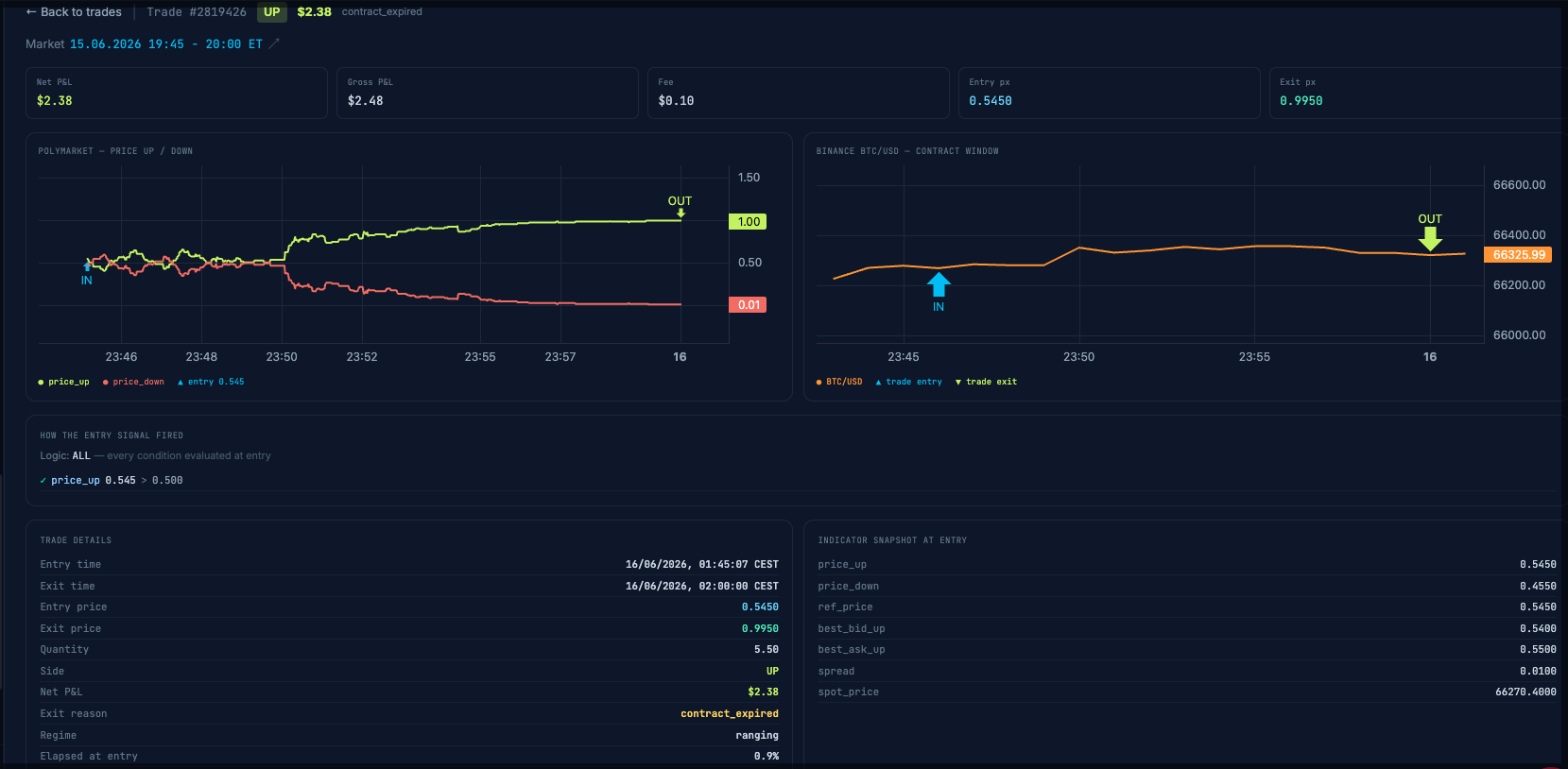 An Up/Down trade card: both price charts with entry and exit markers, the entry conditions with their values, trade details and the indicator snapshot. Demo data.
The card shows:
- Net P&L, Gross P&L, Fee, Entry px, Exit px at the top.
- Polymarket — price UP / DOWN — the contract’s price with IN and OUT markers.
- Binance — contract window — the coin’s spot price over the same window.
- How the entry signal fired — every entry condition with its actual value and a ✓ or ✗, and the logic used (ALL or AND/OR).
- Trade details — entry and exit time, prices, quantity, side, exit reason, market regime and how far into the contract the trade entered.
- Indicator snapshot at entry — including best bid and ask, spread and spot price.
The market name links to that exact market on Polymarket, so you can verify the result yourself.
Crypto and stock trades
Crypto and stock runs have two tabs: Positions and Orders. A position can be built from several orders, for example DCA add-ons or partial takes. Both tabs export to CSV (CSV positions, CSV orders).
The trade card for these runs shows:
- Result (net), Entry → exit (averages), quantity, how long it was held, number of orders and fees, including funding and dividends when they apply.
- A candle chart of the symbol with the average entry.
- Why it entered and Why it exited — the conditions with their values, and the logic (AND or OR).
- Indicators at entry and the list of the position’s orders.
Order reasons read in plain words: entry by rule, DCA add, partial take, protective order (stop/take), grid buy or sell at a level, rebalance, liquidation, and so on. A position still open when the period ended is marked “Open at the end of the period”; its exit is an estimate at the last price. Prices and quantities are adjusted for splits and dividends, so they can differ from the exchange prices of those days.
If a run was computed by an older engine, positions are rebuilt from orders and MAE/MFE are missing. Re-run the backtest to get them.
How to use the trade log
- Open a handful of losers and read How the entry signal fired. If they share a pattern, you’ve found your next filter.
- Compare MAE of winners and losers. If the stop sits inside the normal noise of winners, it’s too tight.
- Check a few trades against the real market to make sure the strategy does what you meant.