Smart money on Polymarket
Updated: 2026-11-14
Smart money is a set of Polymarket scanners that follow large money: a fresh wallet that suddenly bets big, a wallet that built a large position, the markets and events where the most money actually sits. It’s a way to notice where something is happening. It isn’t a signal to copy blindly, and every screen says so.
Where to find it
Open Scanner and add the Smart money windows from the Polymarket group of New window, or use the Polymarket preset. Open Smart money →
Every Smart money screen has the same search line at the top. Paste a Polymarket link, slug, condition_id or wallet address and press Open market. Any Polymarket market can be analysed, not just the ones in our lists. A wallet address opens that wallet’s profile.
Findings feed
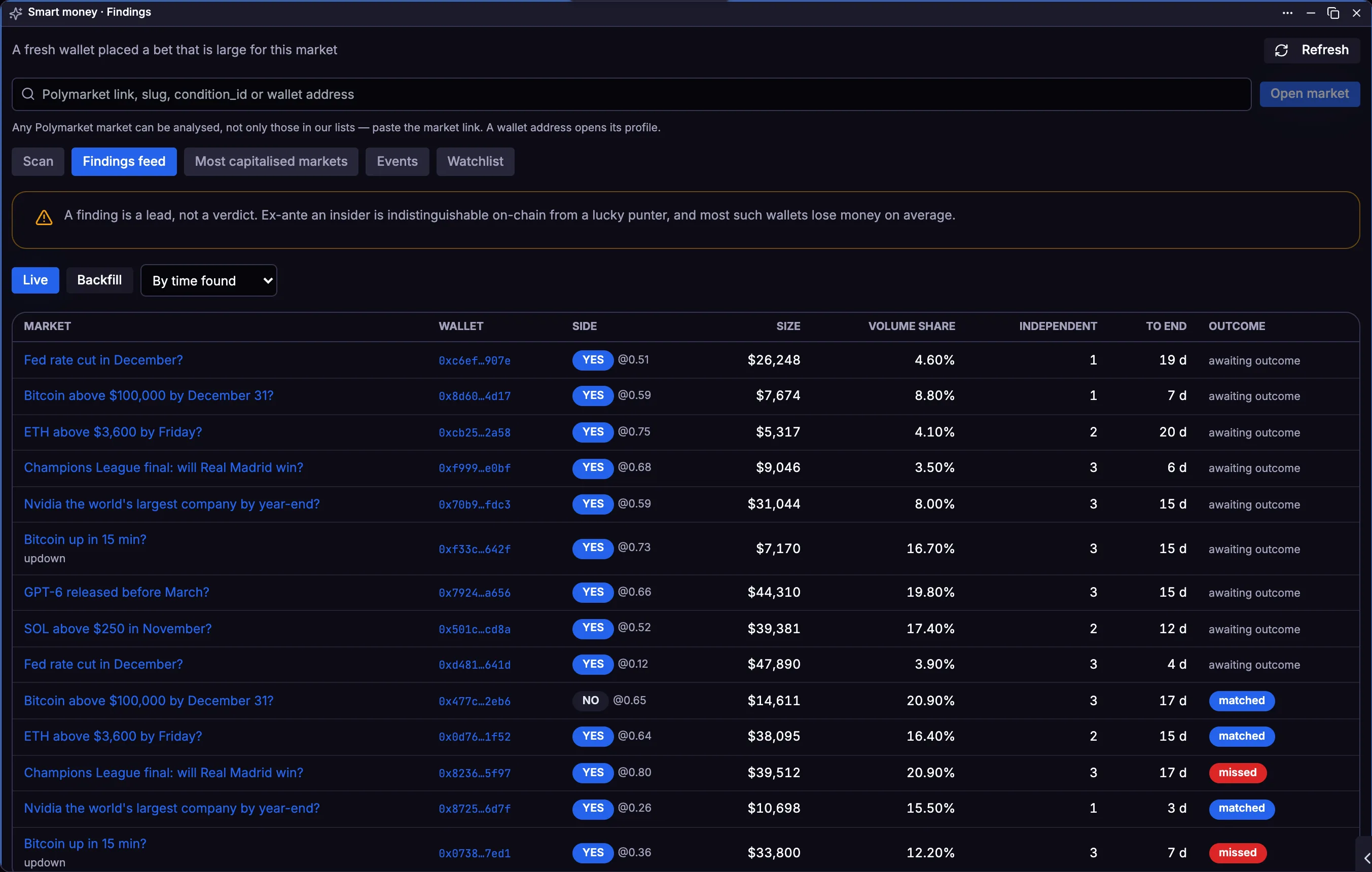 The findings feed. Each row is one fresh wallet that placed a bet large for its market.
A finding means a fresh wallet placed a bet that is large for this market.
| Column | Meaning |
|---|---|
| Market | The market. Click it to open the Market X-ray. |
| Wallet | The wallet address. A cluster mark means several addresses look like one operator. |
| Side | YES or NO, and the price paid. |
| Size | The bet in dollars. |
| Volume share | The bet as a share of the market’s volume. A dash means the volume was unknown at the time. It doesn’t mean zero. |
| Independent | How many independent units (wallets or clusters) bet the same way. |
| To end | Time left until the market ends. |
| Outcome | awaiting outcome, matched (the side won) or missed. |
Switch between Live and Backfill. Live findings were caught as they happened. Backfill findings were reconstructed from history with a different procedure. Don’t merge them into one number. Sort by time found, size, volume share or time to end.
How to read the track record
The headline number on a wallet is the edge over the price the market already offered, not the share of matches. Buying at 0.99 “wins” almost every time and tells you nothing. What matters is whether the side won more often than its entry price implied. A number near zero means the finding adds nothing to what the price already said.
A finding is a lead, not a verdict. On-chain, an insider looks exactly like a lucky punter until the market resolves, and most such wallets lose money on average.
Scan
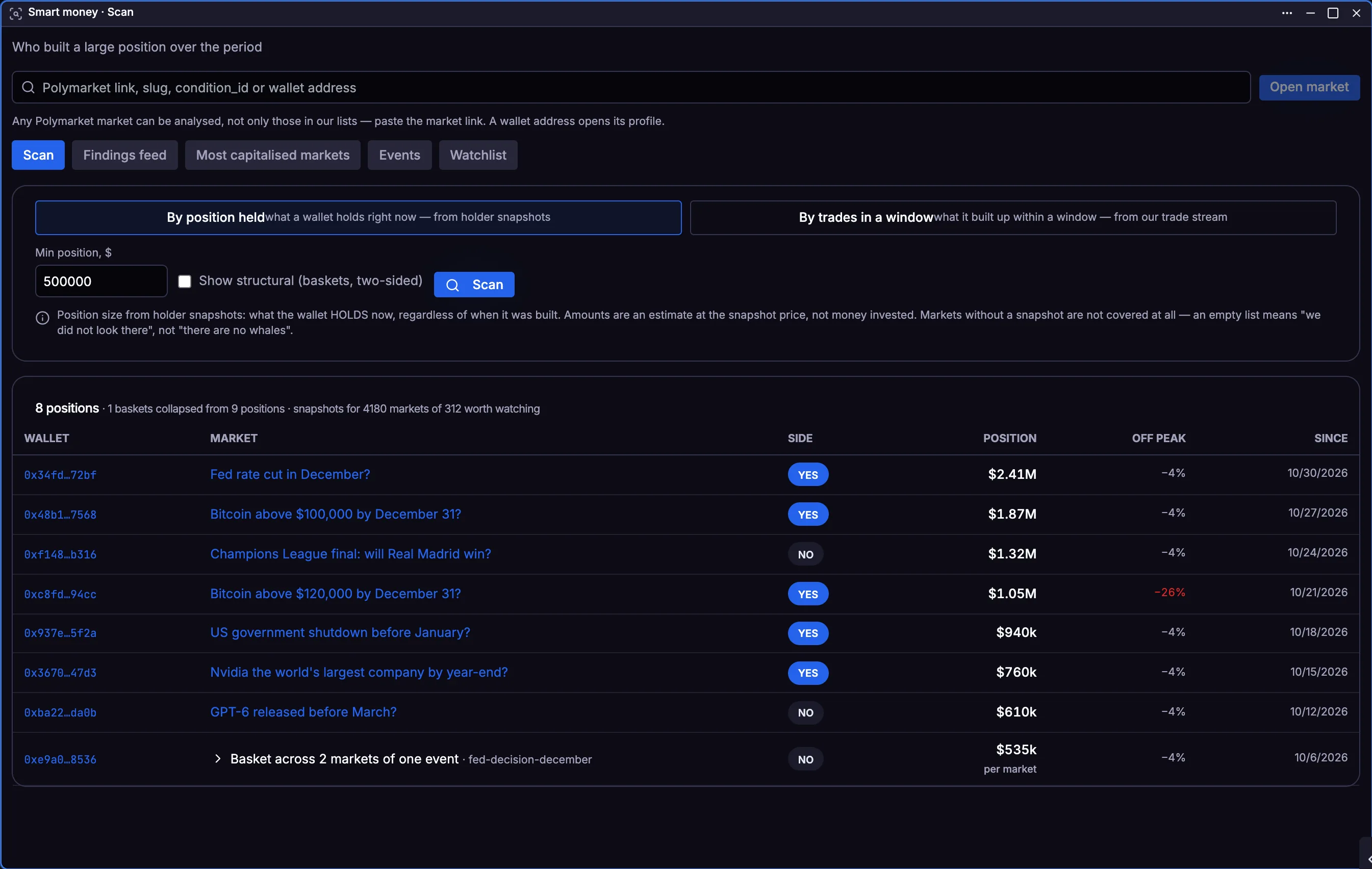 Scan: who holds or built a large position. Baskets across one event are collapsed into one row.
Scan answers “who built a large position?” It has two modes:
- By position held shows what a wallet holds right now, from holder snapshots. Amounts are estimated at the snapshot price. They aren’t the money invested.
- By trades in a window shows what a wallet built up within a period, from our own trade stream.
Set the period, Min position, $, the minimum share of the market’s capitalisation and the market type, then press Scan. Show structural (baskets, two-sided) brings back wallets that hold several legs of one event or both sides of a market. Those are usually hedges, not directional bets. An empty list means “we didn’t look there”, not “there are no whales”. Markets without a snapshot aren’t covered.
Markets
The Most capitalised markets screen ranks Polymarket markets by open interest, not turnover. Turnover can be enormous while very little money actually stays in the market. Filter by category and type (All, Event markets, Scalp) and sort by open interest, holders, 24h turnover or end date.
Columns: Open interest (an estimate: shares × current price), Side skew (which side holds more money), Holders and Turnover.
Events
An event is a group of sub-markets (“Who will win…”, “Fed decision in December”). Events shows the total open interest across sub-markets, the number of sub-markets, the share of the largest one and the end date. Open an event to see its sub-markets and the wallets standing in several of them at once. Those baskets often reveal a strategy you’d miss market by market.
Market X-ray
Click any market to open the Market X-ray:
- Concentration and holders. The largest holders, top-1 and top-5 shares, and how many independent units hold the market.
- Open interest and side skew, with and without market makers.
- Money in and out by day.
- History. What changed between holder snapshots: who entered, exited, added or trimmed.
- Quotes, and Order book: could a whale get out? A position bigger than the whole bid side can’t be sold at market. Its profit is a paper number.
- Trade in terminal opens the market in Terminal Turbo.
The source lists at most 500 holders per token and gives no entry prices, so the tail is cut off and dollar figures are estimates.
Wallet profile
A wallet profile shows the fingerprint (how fresh it is, number of markets, main theme), how it entered a market, where else it stands, linked addresses and its track record on resolved markets. It also gives an explicit list of what cannot be determined. There is no “insider” label here, and there never will be.
Watchlist
Star a market to add it to your Watchlist. It shows price and price move, money in positions, what changed since your last visit, whales (new ones are marked) and time to the end. Starred markets also appear under Saved → Markets.
Acting on a finding
- Open the market’s X-ray. Check concentration, the order book and the price history.
- Open the wallet profile and look at its track record, measured as edge over price.
- If you still see an idea, either:
- trade it manually: Trade in terminal opens the market in Turbo, where you choose the side and size yourself. See Polymarket in Turbo.
- automate it: if a wallet keeps showing a real edge and passes the copyability checks, add it to your leaders list and look at its leader passport.
Risks and limits
- Big money can be wrong, hedged elsewhere, or one leg of a larger structure you can’t see.
- Prices move fast after large bets. By the time you act, the price may already include the information.
- Thin markets are expensive to enter and exit. Check the book before you size.
- All dollar figures are estimates from public on-chain data.