Why a bot isn't trading
Updated: 2026-11-14
A bot that runs but doesn’t trade is rarely broken. Most of the time it’s doing exactly what its rules say: waiting for a signal, refusing a bad price or respecting a limit you set. Each card says why. This article shows where to look and what the common reasons mean for each bot type.
Start with three questions
- Is it running, and in which mode? Check the status on the card and in My bots → All bots. A dry-run bot never places real orders, and its results are shown separately from live.
- How often should it trade? Compare with the backtest. If the backtest made 30 trades in 30 days, a quiet afternoon proves nothing.
- What does the card say? Every type records its reasons: logs and the stop reason (Up/Down), the Signals tab (copy), the Journal (arbitrage), the event log and halt reason (strategy bots).
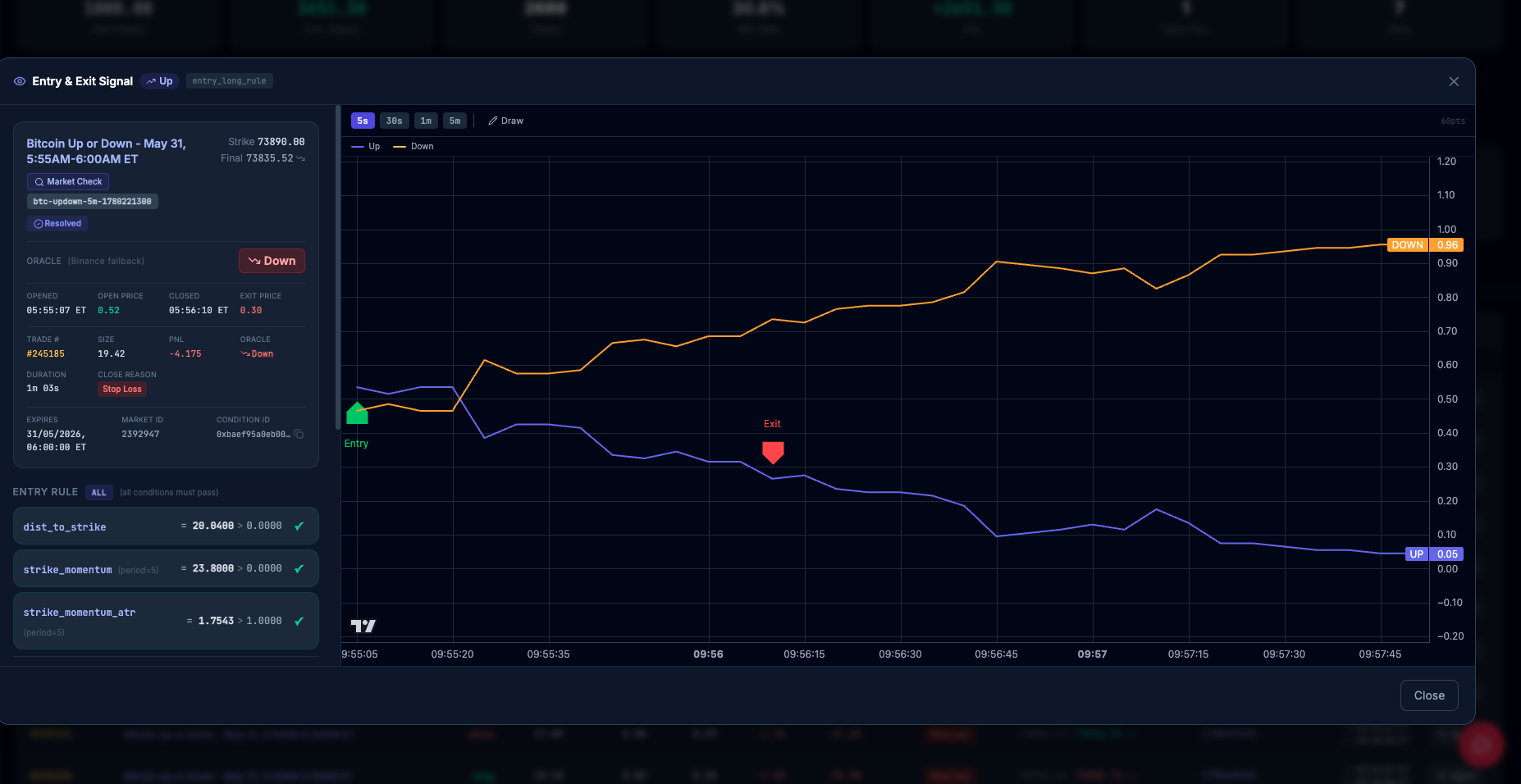 The signal view on an Up/Down bot: every entry condition with its value and threshold. A trade happens only when the rule passes.
Up/Down and paper bots
| What you see | Why | What to do |
|---|---|---|
| Running, no trades for a while | The entry conditions haven’t all been true at once. Common with many ALL conditions, narrow thresholds or a short time window. | Compare the expected trade rate from the backtest with the time elapsed. Narrow it down only if trades are clearly overdue. |
| No trades right after a start | Indicators are warming up. The bot collects its own data from the start; ATR(14) on 60-second bars needs about 14 minutes. | Wait for the warm-up to finish. |
| Start is disabled | The strategy has no entry conditions for any enabled direction | Add entry conditions in the strategy editor |
| Stopped: Wallet is empty | Not enough USDC for the next bet and no open positions | Fund the wallet, then start again |
| The wallet “is still being prepared” | A new wallet is being set up | Wait a few minutes and try again |
| Funded, but still won’t start | The bot may be on a different wallet than the one you funded, or part of the balance needs converting first | Check the wallet on the card. Convert if prompted. |
| Stopped: Dry-run requires wallet USDC < $1 / Funds arrived on the dry-run wallet | Real money is on the dry-run wallet | Move the funds off, or create a live bot |
| Stopped: Proxy IP is geo-blocked | Polymarket refused the connection | Start again. If it repeats, contact support. |
| Stopped: drawdown or daily loss | Your limit was reached, as designed | Find out why before restarting. The daily limit resets the next day. |
| Stopped: Unpaid platform commission | The plan’s commission wasn’t paid | Top up the wallet |
| Paper bot stopped by itself | Its run term ended | Start it again for a new term |
Restarting doesn’t change live conditions. If the market isn’t giving the signal, the bot won’t enter. See Up/Down bots.
Copy bots
A copy bot that “runs but does nothing” is refusing signals, and the Signals tab names each reason. Delay is almost never the cause: the median from the leader’s trade to the exchange is under one second.
| Reason in the feed | What to change |
|---|---|
| Price moved beyond the tolerance | Set a cent tolerance (1–3¢) on cheap markets, or accept a wider percent |
| Already at maximum open positions | Raise Max open positions. The passport suggests the leader’s peak. |
| Less than N until the market ends / Entry too late in market life | Lower Do not enter within, sec or widen the entry window |
| Size below the minimum | Lower Minimum trade, raise the copy scale, or turn on Auto top-up of small add-ons |
| Nothing to sell | The leader exited a position opened before your bot existed. Nothing to do. |
| Not enough funds | Fund the wallet. Capital in open positions isn’t free. |
| Abnormal trade by the leader | Your anomaly guard fired |
| Drawdown / daily loss | Your bot-wide limit stopped new entries. Open positions are still managed. |
The bot also doesn’t buy into positions the leader held before the bot was created, and doesn’t copy trades made while it was stopped. See Copy bots.
Arbitrage bots
Refusals of the pre-entry check aren’t failures. The card shows them in grey: “Did not enter N times, most often: …”. The Journal opens on deals and errors, so switch it to All to see every refusal.
| Kind of reason | Examples | What to do |
|---|---|---|
| Settings you chose | APR below your minimum, coin not in the allowed list, too little volume, max open pairs reached | That’s the filter working. Don’t lower thresholds just to get deals: fees are paid on every one. |
| Market facts | No signal, slippage above the limit, not enough depth, too close to funding settlement | Wait |
| Something to fix | Exchange not connected, not enough free margin, no fresh account snapshot, coin on your stop list, the pair paused after a stop | Connect or fund the exchange, restart a paused bot or pair |
Would fit right now: N in the form is only the selection. The bot checks the live order book and your margin right before entry, so a previewed pair can still be refused. See Arbitrage bots.
Strategy bots for crypto and stocks
| What the card says | Meaning |
|---|---|
| “No position, waiting for the next bar to close” | The bot decides on closed bars only. A daily strategy decides once a day. Stock bots get bars only during New York trading sessions. |
| “Waiting for the bar from the broker…” / “No data since …” | Right after start, or a data feed problem. Check the symbols and the feed. |
| “The grid has not started” | The grid is waiting for its start condition |
| “Orders per day limit” | New entries wait for the next day |
| Halted by a limit | Position size, daily loss or drawdown limit reached. Check the result; change the limit in Edit only if you decide to, then Restart. |
| Halted on the first bar (grid or DCA) | Default limits are too tight for the full ladder or grid. Use Use these values in the bot form. |
| “First order on real money … is under the exchange’s minimum” | Raise First order, % or the capital |
| Halted: no key / key not accepted | Reconnect the key in Brokers |
| Halted: order rejected | Read the broker’s reason: usually balance, minimum size or symbol |
| Halted: foreign trade | A trade on the account wasn’t made by the bot. Compare the account with the bot’s positions. |
| Halted: not confirmed | Start again and confirm real-money trading |
A halt isn’t a close: positions and orders at the broker stay in place. See DCA and grid bots.
What not to do
- Don’t loosen limits, add leverage or pile on conditions just to make a bot trade. A quiet bot is usually its strategy working as written.
- Don’t fight a running bot by hand. Manual trades on the same account confuse its bookkeeping and can halt it.
If nothing here fits, ask Gogo AI or contact support from Help.