Connect a broker
Updated: 2026-11-15
Connect your broker account, and your stocks, ETFs, options and futures join everything else on GoGoBots. Your money stays with the broker. GoGoBots syncs balances, positions and trades into Money, and lets you trade from Terminal Turbo or run strategy bots on the account.
Supported brokers: Alpaca, Tastytrade, Interactive Brokers and Deribit. Use a different broker? If it has an API, we’ll connect it for you. Ask us in the support chat.
Where to find it
Money → Capital → Connect account. The same dialog connects exchanges, Polymarket wallets, brokers and CSV files. On the Money desk you can also open the Brokers window from New window. If you open a stock window in Terminal Turbo without a connected account, it offers to connect one right there.
What each broker gives you
| Broker | Markets | How you connect |
|---|---|---|
| Alpaca | US stocks and ETFs, options | API Key ID and API Secret Key, Live or Paper |
| Tastytrade | Stocks, options, futures | OAuth: Client Secret and Refresh token, Live or Paper |
| Interactive Brokers | Your IB account | Choose Interactive Brokers in Connect account |
| Deribit | Crypto options and futures | API credentials on Exchanges & keys |
Connect Alpaca
- In Alpaca, go to Dashboard → API Keys → Generate.
- In GoGoBots, open Connect account and choose Alpaca.
- Pick the Environment: Paper or Live. Paper and live keys are different and don’t work in place of each other. Starting with paper is a good idea.
- Paste the API Key ID and API Secret Key. You can add a name.
- Click Check. It tests the keys without saving anything and shows the accounts it found.
- Click Connect. The keys are checked again, stored encrypted, and the first snapshot is taken.
An Alpaca key gives full access to the account, because Alpaca has no read-only keys. Treat it like a password. Orders are sent only when you submit them yourself, or when a bot you started on that account trades.
One Alpaca connection serves everything: Money, Terminal Turbo and strategy bots all use the same account. You don’t enter the key twice.
Connect Tastytrade
- On my.tastytrade.com go to Manage → My Profile → API → OAuth Applications and create a new OAuth client. Tick only the read scope.
- Save the Client Secret. It’s shown only once.
- Click Create Grant. That gives you the Refresh token.
- In GoGoBots, open Connect account, choose Tastytrade, pick Live or Paper (live and sandbox need separate OAuth apps), paste the values, then click Check and Connect.
Connect Deribit
Deribit connects like a crypto exchange. Choose Deribit in Connect account, and it opens Exchanges & keys with Deribit selected. Create an API key on Deribit with trading rights and withdrawals off. See Exchange keys.
Connect Interactive Brokers
Open Connect account, choose Interactive Brokers and follow the steps in the dialog.
What you can do after connecting
Track it in Money
The account appears in Capital’s accounts table, in the Stocks market, with equity, cash and money in positions. Positions show up in Capital and positions and Exposure, and trades go into the Journal. Snapshots are taken every 15 minutes, so the history fills in over time. The account’s first value counts as money brought in, not as profit.
Trade stocks in Terminal Turbo
With Alpaca connected, Terminal Turbo has stock windows: Stock search, Chart, Stock ticket, plus Portfolio, Orders and Balance for the account. Place market, limit, stop and stop-limit orders, choose DAY or GTC, and turn on extended hours if you need them. See Terminal Turbo for stocks.
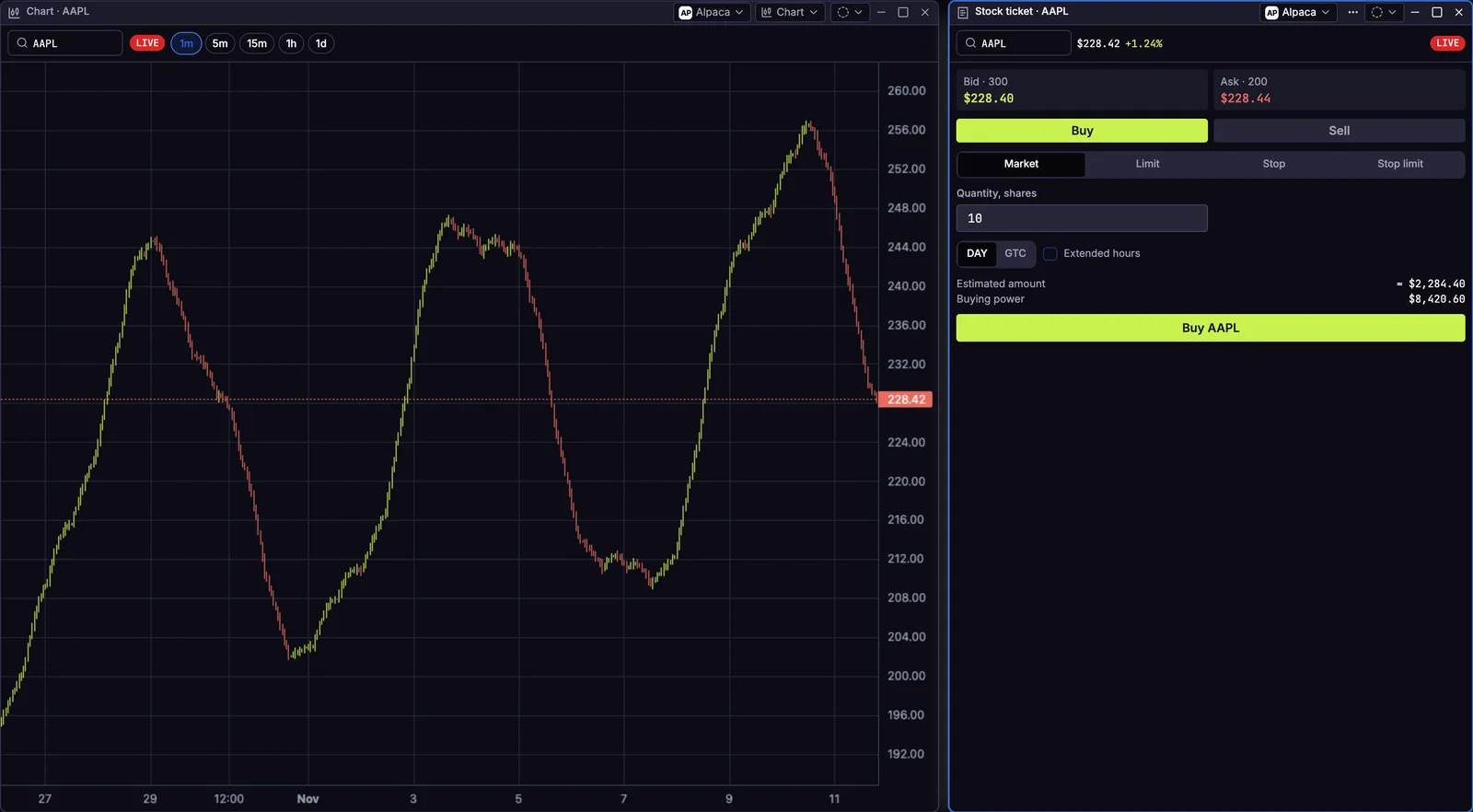
A chart and a stock ticket on an Alpaca account in Terminal Turbo: bid and ask, order type, quantity, DAY or GTC, estimated amount and buying power. Prices are demo data.
Trade crypto options
With Deribit connected, you can trade crypto options and futures in Terminal Turbo’s options windows and build multi-leg positions in the Position builder.
Run strategy bots
Stock strategies can run as bots on your Alpaca account: test the strategy in the Backtester, then create a bot on the paper or live account. See My bots and DCA and grid bots.
Disconnecting
Click Disconnect on the account in Connect account. The keys are erased right away. The snapshot history stays, so your past results don’t disappear.
Plan
Connecting brokers is part of the paid plans. See Plans and billing.
Common errors
| Message | What to do |
|---|---|
| The broker rejected the keys | Check the keys and the environment (Live or Paper). |
| Too many requests to the broker | Wait a minute and try again. |
| The broker is not responding | Try again later. |
Stock data: Yahoo Finance or your broker
Without a connected broker, stock charts, backtests and paper bots use Yahoo Finance. It’s free, so you can start right away, but it’s an unofficial source:
- prices are delayed, with no real-time feed;
- intraday history is short: 1-minute bars for the last 7 days, 2–90-minute bars for about 2 months, hourly bars for about 2 years (daily bars go back many years);
- the feed can change or stop without notice.
Connect Alpaca (a free paper account is enough) and stock data switches to Alpaca’s official market data, without these limits on intraday history. Without a paid Alpaca data plan, the latest prices come from the IEX exchange only, about 2.5% of US trading volume. With a plan you get all US exchanges.
You see this once as a notification. The stock scanner always needs an Alpaca key. Crypto strategies use Binance and Bybit data and don’t need a key.
Risks
Stocks and options can lose value quickly, and options can expire worthless. Leverage, margin and short selling add risk on top. A paper account fills orders under ideal conditions, so live results will differ. Market data can be delayed depending on your broker’s data plan.