What is GoGoBots
Updated: 2026-11-14
GoGoBots puts every market you trade in one place: Polymarket prediction markets, crypto exchanges (spot, perpetual futures and options), and stocks, ETFs and options through your broker. For each idea you choose how to act on it. You can trade it yourself in Terminal Turbo, or hand it to a bot that follows your rules.
Your money sits on your own exchange accounts, broker accounts and Polymarket wallets. GoGoBots connects to them, shows them together and places orders only when you or your bots tell it to.
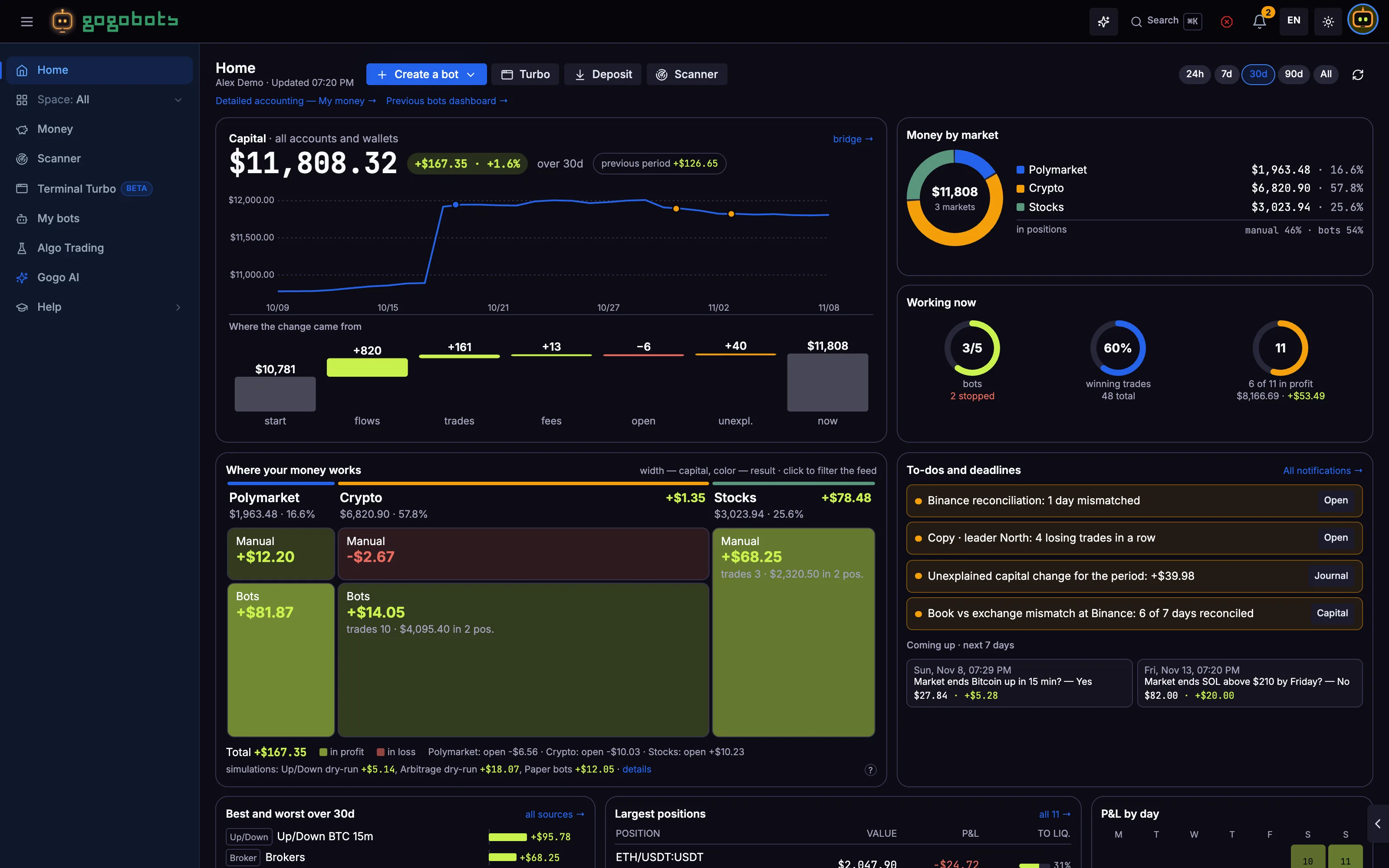
Home: total capital across all accounts, where the change came from, money split by market and by manual vs bot trading, and what needs your attention. Numbers are demo data.
Two ways to trade, every market
| Trade manually | Automate | |
|---|---|---|
| Polymarket | Event catalog, book and ticket in Terminal Turbo; multi-leg positions in the Position builder | Up/Down bots, copy bots, paper bots |
| Crypto | Spot, futures and options tickets in Terminal Turbo; manual arbitrage pairs | Arbitrage bots; strategy bots with DCA and grid |
| Stocks and options | Stock search, chart and stock ticket in Terminal Turbo | Strategy bots on your broker account |
Both paths use the same accounts and show up in the same Money section, so you can compare manual and automated results side by side.
The path: find → test → execute → review
- Find an idea. The Scanner shows where something is happening: smart-money activity on Polymarket, wallets worth copying, price gaps between exchanges, order flow, gamma exposure on stocks, and stock screens.
- Test it. Run a strategy through the Backtester on historical data, or model a multi-leg position in the Position builder before you put money in.
- Execute. Place the trade yourself in Terminal Turbo, or turn a tested strategy into a bot. Every bot can run on paper first, with no real money at risk.
- Track and review. Money shows capital, open positions, exposure by asset, the trade journal and a reconciliation that explains every change in your balance.
Gogo AI helps at every step. It knows the whole platform and can explain a backtest, a bot or a number on screen.
The main menu
The menu on the left has eight sections. Most of them open a desk: a screen of movable windows that you can arrange, save as presets and spread across several monitors. See Desks.
| Section | What it is for | Learn more |
|---|---|---|
| Home | A summary of everything: capital, results by market, manual vs bots, to-dos and upcoming market deadlines. | — |
| Money | Capital, positions, exposure, journal and reconciliation for all your accounts. You also connect wallets, exchanges and brokers here. | Money |
| Scanner | Ideas and market overviews: smart money, copy leaders, arbitrage, order flow, gamma exposure and stocks. | Scanner |
| Terminal Turbo | Manual trading on Polymarket, crypto exchanges and stocks in one window-based terminal. | Terminal Turbo |
| My bots | Every bot on every market in one place: status, results, start and stop. | My bots |
| Algo Trading | Strategies, the Backtester, indicators and the strategy library. | Backtester |
| Gogo AI | An assistant that answers questions about the platform and your own data. | Gogo AI |
| Help | The in-app guide, support chat and system status. | FAQ |
Press Cmd+K (Ctrl+K on Windows) or click Search in the header to jump to any page, bot or action by name. The bell in the header opens notifications, and the red stop button opens the emergency stop.
Paper, dry run and live
You can try almost everything without risking money:
- Backtests replay a strategy on past data.
- Paper bots trade on live market data with a virtual balance.
- Dry-run bots run the real engine and wiring but don’t fill real orders.
- Live bots trade real money, and only after you explicitly confirm it.
See Paper vs live for what each stage proves and what it doesn’t.
Risks you should know about
Trading can lose money, and automation doesn’t change that. Backtests and paper results leave out part of real execution: spreads, slippage, fees, partial fills and changing liquidity. A strategy that looked good on history can lose live. Start small, watch drawdown and use the emergency stop if something goes wrong. Demo numbers on screenshots in these docs show how the screens work, not results you should expect.