Sandbox and position change
Updated: 2026-11-14
Most of the work with options comes after the trade: the price moved, expiry is close, and you need to decide whether to close, roll, add a wing or hedge. The Position builder can load what you already hold and let you try changes on a copy. Nothing reaches the exchange until you send a change yourself.
Load what you hold
Open From portfolio at the top of the builder:
- Load from portfolio opens a dialog. Choose the Source: Positions on your accounts, a Portfolio group, or Polymarket. Tick the positions you want and press Load.
- All BTC positions · N loads every position on the window’s coin in one click and switches to Position change.
What gets loaded:
- One coin only. That is the window’s coin. Positions in other coins are listed as “not BTC”. Switch the window’s coin to work with them.
- The window’s exchange by default. Turn on All venues to add the same coin’s positions from your other exchanges. They show on the chart at their entry price, but you trade them in a window of their own exchange.
- Polymarket positions on the coin’s price become binary legs. Check the payoff type (Price on date, Range or Touch), the level and the date against the market’s rules. The dialog shows those rules and the exact resolution time.
- Up to 40 legs fit in one window.
Loaded legs are marked open. They are drawn at their entry price, they are not bought again, and they don’t count in entry costs. That is why Cost reads $0.00 when everything on screen is already held.
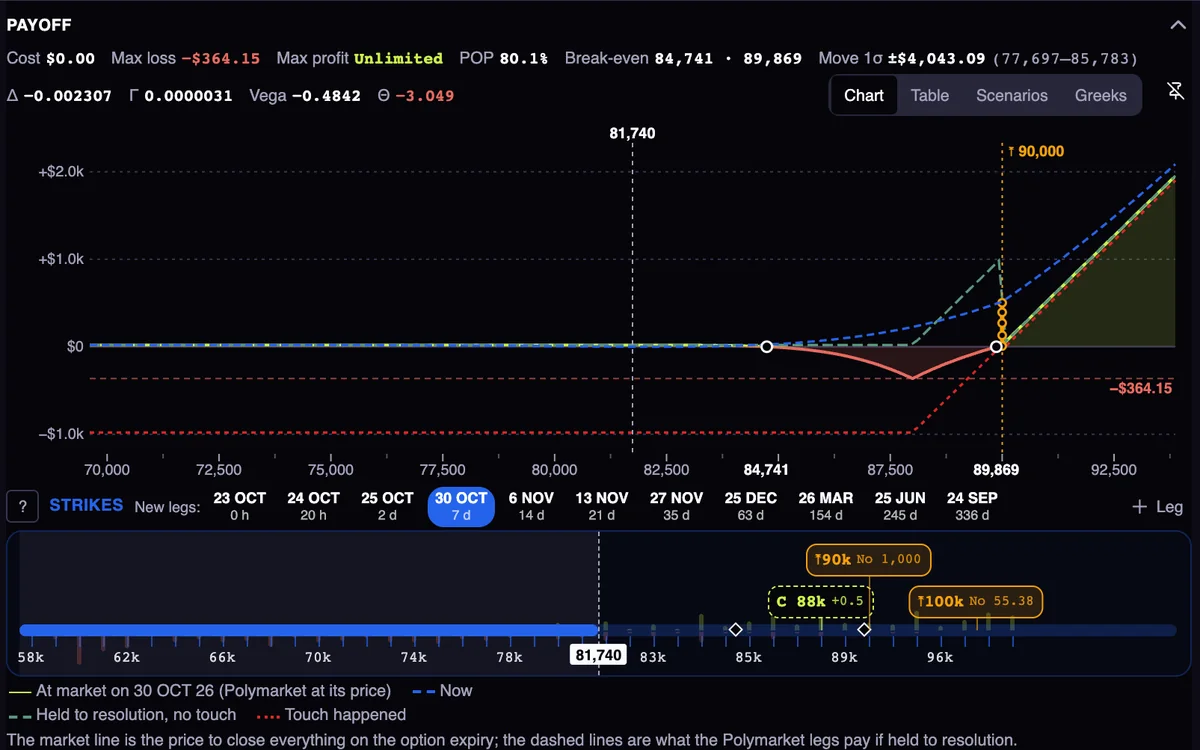 Three positions loaded from the portfolio: a call and two Polymarket “No” legs. The chart shows their combined risk exactly as held today.
Option expiry and roll reminders in Notifications link here too. The builder opens with that position loaded. You can also send a group of positions from Money → Exposure to the builder. See From Exposure to the builder.
Position change: fact versus model
Switch the legs block from Build to Position change. The legs become a table:
| Column | What it shows |
|---|---|
| Leg · fact | The position as it is on the exchange: side, size, entry and mark |
| Model: qty @ entry | The quantity and entry you want to test. 0 closes the leg, less reduces it, more adds to it |
| Trade → exchange | The order this implies, at the price you choose |
| Actions | Hide, reset, and the leg’s menu |
For each leg you can choose Hold, Close, Part or Add, and a price: Bid, Mid, Ask or your own. The builder tells you how that order would behave:
- “fills immediately, ≈ $X by the book”, when your price crosses the book;
- “rests in the book — fill not guaranteed”;
- “worse than market by $X — fills at book prices”;
- “not enough depth: X of Y now, the rest is cancelled (IOC)”.
It also shows the fee (taker or maker), the realized P&L on what you close, and the result “after: qty, avg entry”.
New legs (a hedge, a wing, a roll) are added under New legs from the chain or the ruler, at your price.
What the chart and table show
The chart draws two sets of curves:
- Fact: the position as it stands, drawn faded.
- Model: the position after your changes.
The Fact → model table compares them line by line: realized P&L, cash in or out, max profit, max loss, break-even, chance of profit, delta, gamma, vega, theta, margin estimate and fees. You see what the change buys you and what it costs before you commit.
Hypotheses that never become orders
Some edits exist only to answer “what if”:
- Exclude from model. The leg stays in the list, greyed out, but isn’t counted or executed. Use it to see your risk without one leg, or to split a large change into two executions.
- Model entry. Your own entry price for a leg, such as “what if I’d bought at 150?”. It shifts the model P&L and is never sent as an order.
- Back to fact on a row, or Reset to fact for everything, undoes the edits.
Legs from another exchange or from Polymarket accept these hypotheses too. To actually trade them, use their own window, or Portfolio for Polymarket.
Save and compare variants
Save variant stores the current model: actions, prices, new legs and hypotheses. You can keep up to three. Each saved variant adds its own expiry curve to the chart and a column to the Fact → model table. Apply loads a variant back into the model. Variants are always computed against the current fact.
In Build mode, the same idea works through strategies A–D. See Legs, templates and strategies.
Modelling hedges
Some common checks you can run in the sandbox:
- Delta hedge with the perp. Open Greeks vs price and press Hedge delta with perp. The builder adds the perp trade that brings delta to zero at the current price. Remember that delta drifts as the price moves.
- Cap the tail of a short option. If you hold a sold call or put, add a long option further out of the money as a new leg. The model curve shows the capped loss, and the cost row shows what the cap costs.
- Close the risky part only. Set the model quantity of the most exposed leg lower (for example, 1 → 0.5) and compare max loss and theta in the table.
- Hedge with Polymarket. Add a Polymarket “No” or “Yes” on a level that matters for your options, and check the “no hedge” window if its resolution date differs. See Polymarket legs in a combination.
- Roll instead of close. The Roll button on an open option builds the close-and-open pair with its net cost. See Legs, templates and strategies.
Execute the change
Execute change sends only the Trade → exchange column, as limit orders at your prices:
- Prices that cross the book go as IOC (fill now, cancel the rest).
- The others rest in the book as GTC or Post-only, whichever you pick under Resting orders.
- There is no automatic repricing. If something fills only partly, the builder asks you what to do.
The confirmation screen (“Check the change”) lists every order before anything is sent. One execution sends at most 8 orders. For larger changes, exclude some legs from the model and execute in two passes.
If your position changes after you set the actions (a fill, a manual close, an expiry), the builder warns “The position has changed — recalculate or reset the actions”. It shows what changed. Recalculate for the current position trims closing actions to the current size and drops actions on positions that are gone. Reset actions starts over.
How exact is it
- Exact when filled at your prices: the expiry curve, realized P&L and fees. On Bybit, fees match to the cent.
- Model: the curve before expiry (option pricing model, IV unchanged). Whether a resting order will fill isn’t predicted. Margin is an estimate.
- On exchanges that price options in the coin (OKX, Deribit), the dollar entry price is converted at today’s index, so it’s an estimate.
The sandbox doesn’t search for adjustments by itself. Every variant is one you set up, and the builder shows its consequences.