Up/Down bots
Updated: 2026-11-14
An Up/Down bot trades Polymarket’s short crypto markets: “Will BTC be higher or lower at the end of this 5-minute (15-minute, 1-hour) window?” You write the rules for when to buy Up or Down and when to exit. The bot applies them to every new window, around the clock, from your own Polymarket wallet. You can also trade the same markets by hand in Terminal Turbo.
Where to find it
My bots → Up/Down Bots. Open Up/Down bots →
The strategies themselves live in Algo Trading → Strategies and are tested in the Backtester.
What the bot trades
| Coins | BTC, ETH, SOL, XRP |
| Windows | 5 minutes, 15 minutes, 1 hour |
| Outcomes | Up or Down, each a token priced between $0 and $1 |
| Payout | The winning token pays $1 per share at resolution, the losing one pays $0 |
A market resolves Up if the coin’s price at the end of the window is greater than or equal to the price at the start (the “price to beat”). Otherwise it resolves Down. Polymarket takes the price from the Chainlink data stream for that coin, not from any one exchange.
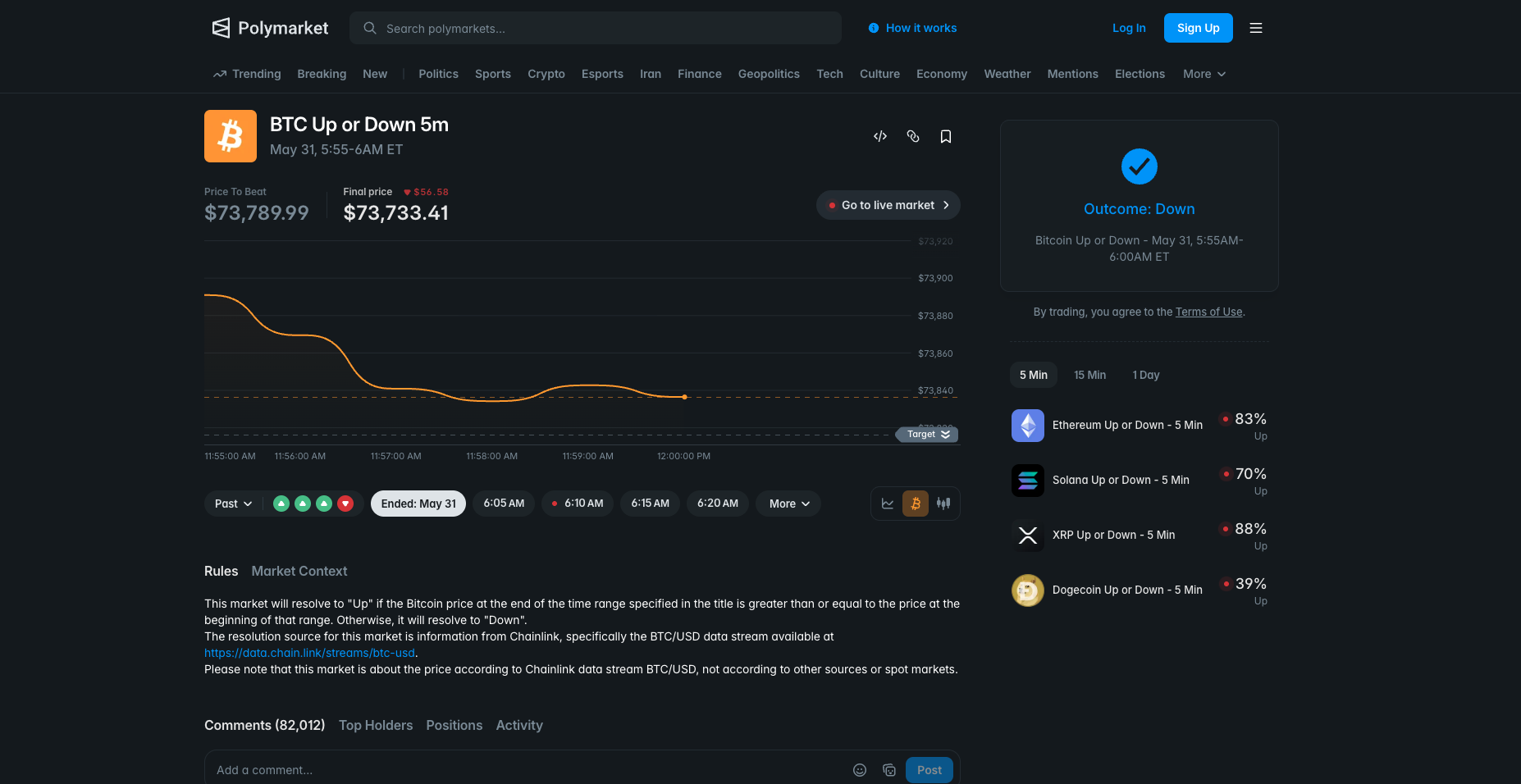 A resolved BTC Up or Down 5m market on Polymarket: price to beat, final price, outcome and the rules.
The token price works like a probability. Buying Up at 0.52 means paying 52 cents for a share that pays $1 if Up wins. If you’re new to these markets, read Polymarket basics first.
The strategy
A strategy answers three questions:
- When to enter. Entry conditions built from indicators: the Up and Down token prices, the spot price, the distance to the price to beat, momentum, volatility, order book imbalance, time elapsed in the window and more. Conditions combine as ALL (every one must pass) or ANY. See Strategies and indicators.
- When to exit. Take profit, stop loss, exit rules, or holding until the window closes and the market switches.
- How much. Bet size and the maximum number of open positions are part of the strategy and are changed in its editor.
A strategy with no entry conditions can’t be started. The Start button is disabled and tells you why.
Creating a bot
The recommended path is strategy → backtest → dry run → live:
- Build or pick a strategy in Algo Trading → Strategies.
- Run it in the Backtester. From a finished run, press To bot, or use Promote → Paper / Promote → Live on its trade log.
- The Create a bot wizard takes it from there: Strategy → Backtest → Dry-run → Live.
You can also press Create a bot ▾ on the My bots desk and choose Up/Down — test (no money) or Up/Down — live.
Pre-flight check
Before a bot trades live, the platform checks the connection to Polymarket:
| Check | What it verifies |
|---|---|
| USDC Balance | The wallet’s balance on Polymarket, ready to trade |
| Geoblock | That trading is allowed from the bot’s connection |
| CLOB Connectivity | That Polymarket’s order system is reachable |
You can create a bot on an empty wallet and fund it later, but it won’t start live until the wallet has money.
Wallets
Each live bot trades from one of your Polymarket wallets on the platform, and the bot signs its own orders.
- Fund the wallet with USDC before going live. If part of the balance is in a form that has to be converted first, the go-live step shows it and offers Convert now.
- A new wallet may still be setting up. In that case the bot can’t start yet, so wait a few minutes.
- Dry-run bots use a separate dry-run wallet that must hold less than $1. That’s what guarantees a test bot never places a real order.
- Withdrawals go only to the payout address you signed. See Funding and wallet safety.
Limits: the bot’s circuit breaker
A live bot has two limits of its own:
| Limit | What happens |
|---|---|
| Max drawdown, % | The bot stops when its equity falls this far from its peak |
| Daily loss limit, % | The bot stops when the day’s loss reaches this share of capital |
Two things catch almost everyone:
- Empty means no limit. There’s no hidden default. A bot with empty limits keeps trading through any loss until the money runs out or you stop it.
- The strategy’s own circuit breaker isn’t the bot’s limit. Drawdown and daily-loss settings inside a strategy work in backtests and on paper. A live bot is protected only by the limits set on the bot.
Pick numbers you can live with. Daily loss is what you’d accept losing on one bad day. Max drawdown is the point where you’d want the bot stopped and re-examined.
Why a bot stopped
The card shows the reason, and you also get a notification:
| Reason | What it means |
|---|---|
| Drawdown or daily loss | Your limit was reached |
| Wallet is empty | Not enough USDC for the next bet and no open positions |
| Proxy IP is geo-blocked | Polymarket refused the connection |
| Dry-run requires wallet USDC < $1 / Funds arrived on the dry-run wallet | Real money is on the dry-run wallet |
| Unpaid platform commission | Top up the wallet to resume |
| No entry conditions | The strategy has nothing to enter on |
Watching a running bot
The bot card shows start and current equity, trades, win rate, P&L, open positions and runs, split into Up (long) and Down (short) results. Its tabs are Chart, Equity Curve, Trades, Positions, Orders, Strategy, Logs, Configuration and Runs. Every order links to the signal that triggered it.
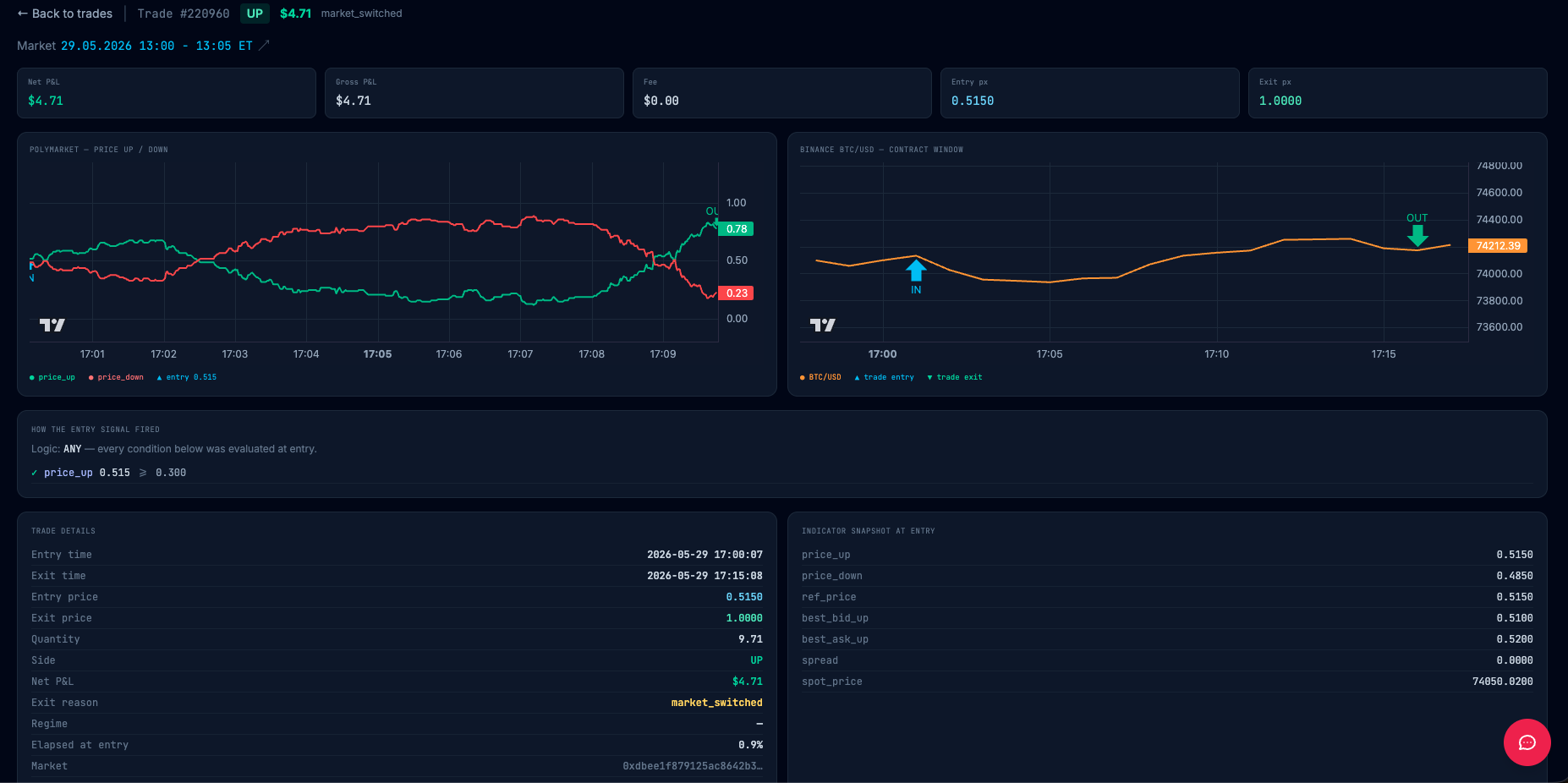 One trade in detail: the Up/Down token prices, the BTC price over the window, the condition that fired and the indicators at entry.
Money that left the wallet isn’t lost. Under the wallet balance the card shows what’s in open positions and what’s waiting for payout after a won market. The platform collects payouts automatically, usually within minutes.
Editing the strategy of a running bot restarts it with the new settings. Plan changes for a moment when that’s safe.
Limits and risks
- These are binary bets: a wrong side loses the whole stake on that position.
- Polymarket charges a taker fee that depends on price and size. It’s deducted from the bot’s result. See Glossary.
- After a start, indicators need a warm-up. For example, ATR(14) on 60-second bars needs about 14 minutes of data before the bot can act on it.
- A strategy tuned on a short history can fail on new data. Run validation before going live.